Your Xteink, now a
one-button Headwater reader.
Read YouTube channel summaries on an e-ink reader. Flash one file to your Xteink X3 or X4 and one button pulls your daily Headwater digest onto it over OPDS. No phone, no feed, no notifications. Just today's ideas, ready to read.
Built on CrossPoint, the open firmware for the Xteink X3 and X4. MIT license.

What it is
Everything CrossPoint does.
Plus your daily read.
Headwater turns the YouTube channels you follow into a concise daily digest: written summaries that tell you what's worth watching. Headwater Edition puts that digest on your reader, a free, MIT-licensed fork of CrossPoint with a dedicated Headwater app added on top.
Everything CrossPoint already does still works underneath: EPUB reading, file browser, OPDS, transfers, themes. This just adds the digest.
What you get
The digest, made for the device.
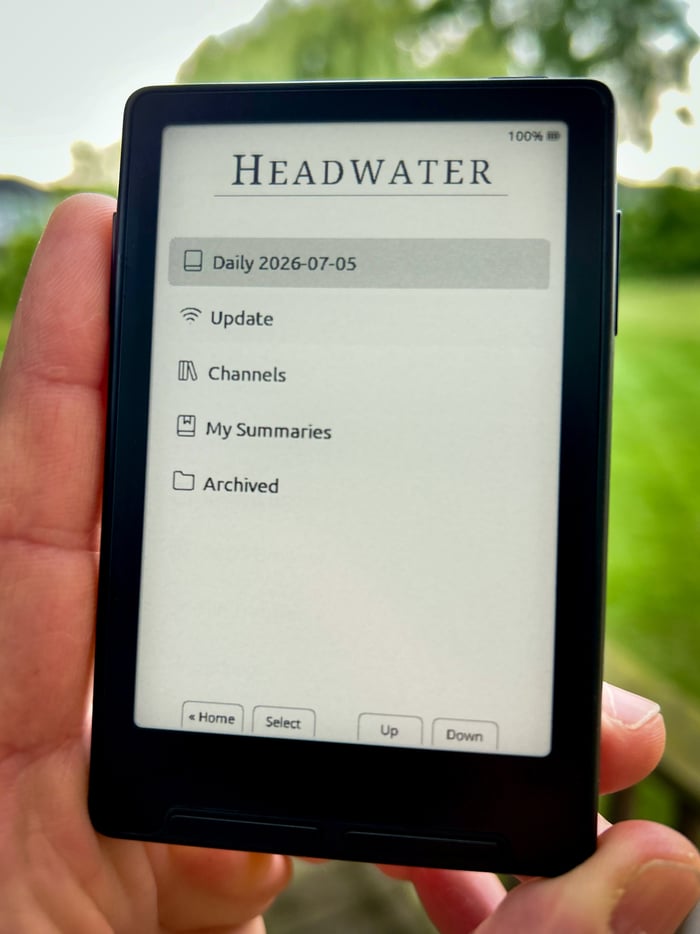
one clean screen from the reader
- Channels, not a feed. Summaries are filed under the channels you follow. Nothing piles up waiting for you. Power on, open Headwater, press Update, and it pulls the recent issues you don't have yet.
- My Summaries. A home for the collections you send to the device from Headwater.
- Stays tidy. Delete an issue and it's gone for good. Older issues roll into Archived.
- Keeps your library. Headwater Edition is a fork, not a wipe. Your books, reading progress, and Wi-Fi/OPDS setup live on the SD card and carry straight over. (As with any firmware flash, back up your SD card first.)
Install
A few minutes, once.
- Download
Grab the Headwater Edition
.bin. - Flash it
Plug the reader into your computer via USB and open the CrossPoint web flasher. Choose custom / upload firmware, select the
.bin, and flash. - Link your account (no typing on the reader)
On the reader: join Wi-Fi, then open File Transfer. It shows a web address. On a computer on the same Wi-Fi, open that address and go to Settings → OPDS servers → Add. Paste your Headwater feed URL (copy it from your Account → E-reader sync page); leave username and password blank. Save.
- Read
Open Headwater and press Update. Your latest issue downloads and opens.
Your feed URL saves to the device and survives reboots. You only do step 3 once.
Requirements
What you need.
Flashing writes a complete firmware image, so it works whether your reader is stock or already running CrossPoint.